
Can You Trust AI in Your General Ledger? A Field Guide Using Kick's Own Documentation
Every AI accounting company has an AI-safety page. Almost none of them survives a careful reading. The pattern is familiar: bold claims about human-in-the-loop review, vague language about "guardrails," and a marketing chart showing an accountant confidently approving, green-lit AI suggestions. The technical mechanism behind the marketing is rarely stated, and when it is stated, it rarely matches what the product actually does.
Kick is an exception, and this piece is about why. Not because Kick has solved the AI-safety problem in accounting, but because Kick's own documentation describes what it built with unusual precision and then tells you three times that the mechanism only protects you if a human actually reads the preview before confirming. That combination (a real engineering guarantee plus a candid admission of its limits) is the most honest AI-safety posture I have found in an accounting platform.
This is a field guide. I use Kick as the worked example because Kick documents the mechanics in verbatim detail, but the framework generalizes to every AI-native accounting platform launched in the past three years. If you are a CPA evaluating whether to point an AI assistant at a client's general ledger, or a controller trying to design compensating controls around AI-assisted bookkeeping, this piece is for you.
Everything below is sourced to Kick's own documentation as of 15 September 2026. Kick ships fast, and specific mechanics may evolve. Verify current documentation before designing production controls and treat this piece as a framework for evaluation rather than a static instruction manual.
💡 Key Takeaways
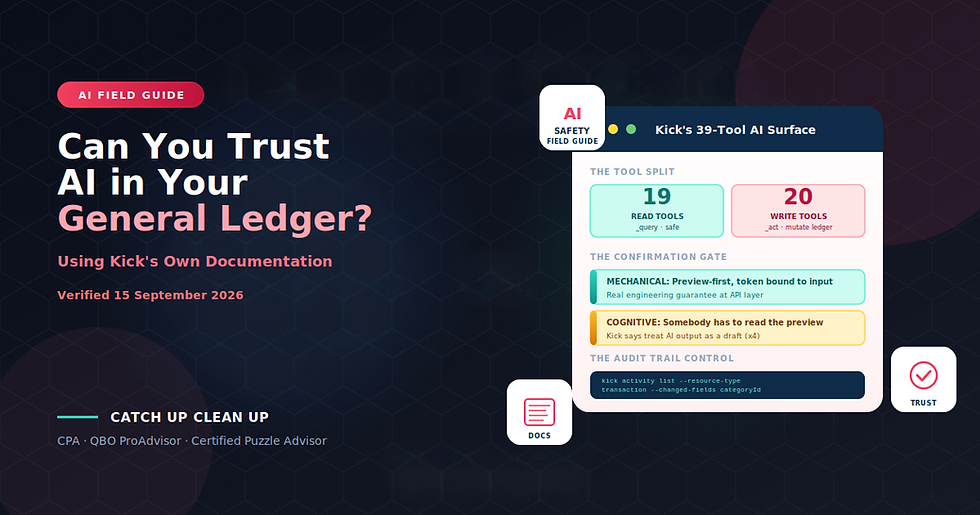
Kick exposes 39 tools to AI assistants through its Model Context Protocol (MCP) server. 19 are read-only (_query), and 20 can mutate the ledger (_act)
The 20 write tools can create and delete GL accounts in bulk, bulk-create journal entries, set opening balances, merge counterparties, and create categorization rules that then affect future transactions at scale
The confirmation gate is a real engineering guarantee, not a UI dialog: every write tool is preview-first, with a single-use token bound to the exact input, enforced at the API layer, applied without exception across all 20 write tools
The gate is mechanical, not cognitive. Nothing prevents a human or a script from immediately echoing the token back without reading the preview. The control depends entirely on someone actually reviewing what will happen
Kick tells you three times to treat AI output as a draft, never as an approval. The documentation never claims the AI is correct
The third-party data warning is unusually candid. Once your client's ledger data reaches Claude, ChatGPT, or Gemini, it is governed by that vendor's privacy policy, not Kick's. Consumer AI plans may use the chat for training unless you disable it
The audit trail workflow is the single most useful control for firms adopting AI-assisted bookkeeping. A one-line CLI command lists every AI-driven category change with actor, timestamp, and diff
Kick chose NOT to publish write automation for cleanup work. All three documented reconciliation-and-cleanup CLI workflows are read-only. That is a judgment call worth crediting
Verified 15 September 2026: Kick's AI architecture is actively developed; verify current tool surface and mechanics before designing production controls
Part 1: What AI in the Ledger Actually Means at Kick
Before evaluating AI safety, it helps to know what "AI in the general ledger" actually consists of at Kick. This is not a chatbot dropped into a settings page. Kick built two programmatic surfaces that expose the ledger to AI assistants and to command-line automation.
The MCP server at https://use.kick.co/mcp implements the Model Context Protocol, which lets AI assistants like Claude, ChatGPT, Gemini, Cursor, Perplexity, and Microsoft Copilot Studio connect to your Kick workspace and read or modify data. Authentication uses OAuth when available, otherwise a personal access token (PAT) prefixed kick_pat_, generated in Settings → API. Scopes are mcp:read and mcp:write. Kick's marketing claims setup takes "5 minutes with no technical knowledge required."
The CLI is a npm package (@kickfinance/cli) requiring Node.js LTS. It handles the same underlying operations as MCP but is designed for terminal use, scripts, and scheduled automation. The two surfaces share Kick's authorization backend, so a PAT for MCP is also a PAT for the CLI.
The tool surface exposed through MCP is precisely 39 tools, split by naming convention: query for read, act for write. Nineteen tools read data. Twenty tools can mutate the ledger.
That is a significant surface area, and it deserves inspection before you connect an AI assistant to a client's books.
The 19 Read Tools
The read tools are straightforward: context_browse, context_resolve, financial_accounts_query, transactions_query, categories_query, classes_query, counterparties_query, rules_query, accounting_query, opening_balances_query, journals_query, reports_query, documents_query, documents_download, entities_query, activity_query, tasks_query, list_kick_skills, and load_kick_skill.
These let an AI assistant navigate the workspace structure, list transactions with filters, pull reports, retrieve journal entries, download attached documents, and query the activity log. Nothing here mutates data. If you scope your PAT to mcp:read only, this is the entire surface an assistant can touch.
For most exploratory uses of AI in accounting (drafting client messages, investigating anomalies, generating summaries), read-only access is enough. Kick explicitly recommends this default position: "Prefer read-only PATs for lookup, reporting, and review workflows."
The 20 Write Tools
Where the interesting design conversation begins. Kick's documentation lists these verbatim.
Tool | What it can do |
transactions_act | update, bulk_update, update_splits, bulk_unsplit, create_manual, bulk_mark_for_deletion, cancel_deletion |
transactions_transfer_matches_act | match, unmatch |
transactions_document_links_act | link, detach |
categories_act | create, update, delete (blocked in GL-first workspaces) |
classes_act | create, update, delete (Classes plan) |
counterparties_act | create, update, delete, merge, copy_global |
rules_act | create, update, change_order, delete, plus rule group operations |
accounting_act | create, update, bulk_update, bulk_disable, bulk_enable, bulk_delete GL accounts |
account_groups_act | create, update, delete |
opening_balances_act | upsert, bulk_set, remove |
journals_act | create, bulk_create, update, delete journal entries |
documents_act | request_upload, confirm_upload |
entities_act | create, update, update_address, save_tax_locations |
activity_undo | revert prior batches |
tasks_act | create, update, delete |
organization_clients_create | create a whole new client workspace (firm-admin only) |
invoices_create / invoices_update | AR (Accrual Ledger plan) |
bills_create / bills_update | AP (Accrual Ledger plan) |
Read that table with the eye of someone who is about to hand an AI assistant those keys. The MCP can create and delete GL accounts in bulk, bulk-create journal entries, set opening balances, merge counterparties (which cannot be undone), and create categorization rules that then affect future transactions at scale. That is not a limited tool surface. That is authority over the ledger.
The scoping decision matters here. When you connect Kick to Claude, ChatGPT, or another MCP client, authorization scope is chosen at connect time. In Claude, the options are "All my workspaces" or "Selected workspaces." In ChatGPT, the options are Read & write or read-only, with workspace scope by all, by organization, or by selected workspace. The narrowest useful scope is: Read-only, on a single specific client workspace, from a specifically named PAT.
If you are experimenting with AI in accounting for the first time, start there. Broader scopes should follow specific control design, not default assumptions.
Part 2: The Blast Radius, Honestly Stated
Before evaluating any AI safety mechanism, it helps to be explicit about what it is protecting against. What can go wrong when an AI assistant has written access to a general ledger?
Bulk journal entry creation. journals_act can bulk_create journal entries. An AI assistant that misinterprets a natural-language instruction could create hundreds of journal entries in seconds. Reversal is possible via activity_undo, but reversal after the fact requires noticing that something went wrong first.
GL account structure changes. accounting_act can bulk_delete GL accounts. In GL-first workspaces this is scoped, but the fundamental capability exists.
Rule creation with downstream effects. rules_act creates categorization rules that then affect future transactions automatically. A well-intentioned rule created by an AI assistant based on a partial understanding of the client's business can silently miscategorize transactions for months before anyone notices, at which point unwinding the effect requires the audit-trail workflow described later in this piece.
Counterparty merges. counterparties_act includes a merge operation. Counterparty merges cannot be undone at Kick per its own documentation. An AI assistant merging two counterparties based on name similarity that turns out to be a coincidence creates a data integrity problem that has to be manually reconstructed.
Opening balance changes. opening_balances_act can upsert and bulk_set opening balances. Opening balances affect every downstream period. An AI assistant modifying opening balances based on a misread instruction produces cascading errors that show up in every subsequent report.
New client workspace creation. organization_clients_create creates entire new client workspaces. This is firm-admin only, but the capability exists in the tool surface.
I list these not to argue that Kick's architecture is unsafe. I list them because AI safety in an accounting context is meaningless without knowing what "unsafe" would concretely look like. If a firm's controls are designed around the assumption that an AI assistant will not accidentally create a hundred journal entries or merge two unrelated vendors, and
Kick's own documentation says the AI assistant has exactly those tools available, the control design needs to be revisited.
Kick's confirmation gate is designed to prevent exactly these outcomes. Whether it succeeds depends on how the gate works in practice.
Part 3: The Confirmation Gate — the Strongest Pro-Trust Argument
Kick's design decision worth crediting: the preview-first confirmation pattern.
Verbatim from Kick's tool reference: "All write tools are preview-first. Call the tool without confirmationToken → receive a preview object describing the action and a fresh token. Re-call with the same input plus the returned confirmationToken → mutation executes."
And immediately after: "Never invent or reuse a token. Each preview issues a new token bound to the exact input."
Read that carefully. The token is bound to the exact input. It is single use. A model structurally cannot preview a $500 recategorization and then commit a $500,000 journal entry, because the token bound to the $500 preview will not authorize the $500,000 mutation. This is a guarantee enforced at the API layer, not a UI "are you sure?" dialog. It applies to every one of the 20 write tools without exception.
Kick states this three more times across the documentation, for good measure:
"Kick MCP is read-only by default, with explicit confirmation required before any changes."
"The agent will always show you a preview before making any changes. Confirm or cancel before anything is saved."
"Write operations require your explicit approval before execution."
Why this matters technically. Compare this pattern with a system where an AI write tool commits the instant it is invoked. In that system, the AI assistant's judgment is the only control. If the assistant misinterprets the instruction, the mutation happens. The user finds out afterward, when the effect shows up in a report or when someone notices the anomaly.
Kick's preview-first pattern inserts a mandatory second step. The AI assistant issues the preview call. The system returns a preview object describing exactly what will happen if the mutation is committed. Then the AI or a human has to make a second call, passing the token, to actually commit the change. This is not a "please confirm" dialog. It is a structural requirement enforced at the API level.
For a control designer, this pattern is materially better than the alternative. It converts a one-step mutation into a two-step process where the second step requires seeing the preview. It gives you a place to insert human review. It gives you a place to insert automated policy enforcement (a script could refuse to commit any preview above a certain dollar threshold, for example). It is the strongest single design decision I have seen in an AI-native accounting platform.
Credit where credit is due: Kick built a genuine engineering guarantee here, described it precisely in the documentation, and applied it consistently across the entire write-tool surface.
Part 4: Why the Gate Isn't Enough
Here is where the story gets interesting. Kick itself says the gate is not enough and says it three separate times.
"Do not automate confirmation unless the workflow has been reviewed and approved by your firm."
"Commands that change data require preview confirmation and should not run unattended unless [approved]."
Confirmation checklist: verify "the assistant or script is not acting on stale output."
The gate is mechanical, not cognitive. Nothing prevents a human, or a script written by a human, from immediately echoing the token back to Kick without reading the preview. The control depends entirely on somebody actually reading the preview and understanding what it says before confirming.
Think about what this means in practice. A firm that connects Claude to Kick and instructs the assistant to "clean up my counterparty list" is trusting Claude to make correct judgments about which counterparties are duplicates. Claude issues a preview showing "Merge Acme Corp and Acme Corporation." A human sees the preview, thinks that looks reasonable, confirms. The merge is committed. But what if Acme Corp and Acme Corporation were two different legal entities that a former bookkeeper had deliberately kept separate for tax purposes? The confirmation gate did not protect against this outcome. It only made the mutation two steps instead of one. The judgment gap was covered by the person confirming, and the person confirming trusted the preview.
This is not a criticism of Kick's design. It is an honest reading of what the design does. And Kick documents this reality with unusual candor, throughout the documentation:
"Treat AI assistant output as a draft, not an approval."
"Treat assistant output as a draft until an accountant reviews it."
"Use this pattern when you want the assistant to structure a complex entry without skipping accountant review."
"Always have it draft first, never post directly from a document without review."
The documentation never claims the AI is correct. It says the opposite, repeatedly. Which is the single most important thing to understand about AI in an accounting context.
The control designer's takeaway. The confirmation gate is a necessary condition for AI safety in an accounting context. It is not a sufficient condition. Sufficient controls include: read-only defaults for exploratory work; single-workspace scoping for early adoption; a firm policy against automated confirmation; specific instructions in the AI assistant's prompt to always draft, never post directly; and monthly review of the activity trail against AI-attributed changes.
The gate is the foundation. The judgment is still yours.
Part 5: What Kick Tells You Three Times
Read the documentation carefully and you notice a pattern. The most important instructions are stated three times.
"Treat AI assistant output as a draft." Stated four times across the documentation, in slightly different phrasings. This is Kick's core AI-safety message. It is not sales oriented. It is a straightforward instruction to the firm reading the documentation.
"Do not automate confirmation." Stated three times. This is the corollary. The confirmation gate only protects you if you actually read the preview. If you write a script that automatically confirms every preview, you have architecturally converted a two-step
mutation back into a one-step mutation and given up the guarantee.
"Never invent or reuse a token." Stated verbatim in the tool reference. This is a security boundary. Tokens are bound to exact inputs, single-use, and non-transferable. A script that tries to "save time" by reusing a confirmation token from a previous preview will fail, correctly.
"The assistant or script is not acting on stale output." From the confirmation checklist. This is the subtle one. A preview issued five minutes ago may describe a state of the ledger that has since changed. The confirmation still commits based on the state at the time of confirmation. If another user updated data in between, the confirmation may not do what the preview described. This is not a bug in Kick's design; it is a fundamental limitation of two-step mutations against a live database. It has to be planned around.
Combined, these four repeated instructions describe the control model Kick actually wants you to implement:
Use AI to draft, not to approve.
Have a human read every preview before confirming.
Do not architect around the confirmation gate; treat it as the mandatory human-review step.
Watch for stale-preview problems in scripted workflows.
This is a genuinely thoughtful set of guardrails, and it is described in the documentation with precision. It is not marketing. It is engineering guidance to the firm operating the system.
Part 6: The Third-Party Data Problem
Kick's most quotable line on AI safety appears on the Google Sheets integration page, not on the MCP page.
"Any AI tool you connect to a spreadsheet containing Kick data can read that financial data, and third-party tools are governed by their own privacy and data-training policies, not Kick's."
This is the disclosure most software companies bury. Kick states it plainly. And the same principle applies to the MCP server itself: once your client's ledger data reaches Claude, ChatGPT, Gemini, or any other third-party AI assistant, it is governed by that assistant's terms and privacy policies, not Kick's.
Kick's Claude connector page makes this explicit:
"When you connect Kick to Claude, your use of Claude is governed by Anthropic's terms and privacy policies, not Kick's."
"On individual plans (Free, Pro, and Max), chats are used for training unless you turn off Help improve Claude in your privacy settings."
"Team and Enterprise fall under Anthropic's Commercial Terms, and that data is not used to train Claude."
"Some Claude features can take action. Not all integrations are read-only."
"Use copies of important files."
Read this for what it says. A firm connecting Claude Pro (a consumer individual plan) to a client's Kick workspace is potentially exposing that client's ledger data to Anthropic's training pipeline unless the firm has affirmatively disabled the "Help improve Claude" setting. This is not hypothetical. It is documented behavior.
The practical implications for a firm considering AI-assisted bookkeeping:
Consumer AI plans (Claude Pro, ChatGPT Plus, Gemini Advanced) may use conversation content for model training. This is true across the industry, not specific to any one vendor. For a firm handling client confidential financial data, this is a real professional obligation issue. Client engagement letters typically do not authorize the firm to submit the client's data to a third-party AI model for training purposes.
Business AI plans (Claude for Enterprise/Teams, ChatGPT Team/Enterprise) generally do not train on customer data. These are the appropriate plans for firm use. But they cost meaningfully more per seat, and the firm-billed cost may exceed the workflow value for firms just starting to experiment with AI.
The client's data governance context matters. Some clients have contractual obligations to their own customers or investors that would be violated if their ledger data touched a consumer AI training pipeline. Others do not. The firm has to know which is which and design its AI workflows accordingly.
Copies of important files should be maintained outside the AI-connected workspace. Kick documents this recommendation and it is worth adopting. If an AI assistant modifies data in ways that turn out to be wrong, a clean backup is your recovery path.
The vendor telling you that once your data reaches their third-party partner's assistant, it is governed by that partner's policy, is the sort of disclosure most software companies bury. Kick states it clearly, in the documentation, on multiple pages. Credit them for that and take the warning seriously.
Part 7: The Audit Trail — the Single Most Useful Control
If there is one control every firm adopting AI-assisted bookkeeping should implement, it is the AI-attribution audit trail.
Kick's CLI documents this workflow verbatim:
kick activity list --resource-type transaction --changed-fields categoryId --limit 25 --output jsonThat command lists every transaction where the categoryId was changed, ordered by recency. Passed through jq to filter by actor (the PAT name used by the AI assistant), you have a scheduled audit of every AI-driven category change in your workspace.
Why this matters. The MCP server inherits Kick's normal audit trail. Every mutation, whether initiated by a human user in the UI or by an AI assistant through MCP or CLI, is logged with actor, timestamp, and diff. This is not an optional log; it is the same audit trail that supports all activity in Kick.
Which means the AI-attribution problem has a mechanical solution. If your firm's PAT for the AI assistant is named descriptively (Kick recommends this: "Name tokens descriptively, for example 'Month-end review script,' so ownership stays clear in the audit trail"), you can query the activity log for that PAT's actions in any period. You can see exactly what the AI changed, when, from what to what. You can spot patterns of miscategorization before they compound.
A firm-standard monthly control worth implementing:
Run the activity list query for every AI-attributed PAT at the end of every month
Filter to changed-fields that matter (categoryId, journal amounts, counterparty merges, rule creations)
Review the changes for material or unusual patterns
Document the review in a workpaper
Reverse via activity_undo any changes that should not have been made
This is the compensating control that makes AI-assisted bookkeeping defensible from a controller-audience perspective. It converts "we trust the AI" (which is not a control) into "we log every AI-driven change and review them monthly against a documented threshold" (which is a control).
Kick's documentation names activity_undo explicitly: "The agent can mark transactions for deletion or cancel a pending deletion." Combined with the activity log, this gives you both the detection mechanism (the log) and the remediation mechanism (the undo). This is a genuinely well-designed audit posture.
Part 8: Where Kick Chose NOT to Build Write Automation
Here is a design decision worth crediting explicitly.
Kick's CLI documentation organizes use cases into six categories: Monthly Reporting, Transaction Management, Reconciliation and Cleanup, Data Analysis, Integration Scripts, and Advanced Scripting.
Every use case is labeled Read or Write.
All three workflows in the Reconciliation and Cleanup section are read-only. Kick publishes no write automation for cleanup work at all. The three published workflows are:
Daily uncategorized transaction alert (transactions find --since ... --fields id,date,category --output json, filtered through jq for null categories)
Find transactions missing a memo (same pattern on memo field)
Review recent category changes (activity list --resource-type transaction --changed-fields categoryId --limit 25 --output json)
That third one is the audit-trail workflow from Part 7. A scheduled version of that script is the single most useful control any firm adopting AI-assisted bookkeeping could implement.
But note the design decision. Kick could have published bulk-recategorization automation. Kick could have published rule-mass-application scripts. Kick could have published bulk-merge counterparty automation. Instead, the published cleanup workflows are all read-only. If you want to automate cleanup writes, you have to write the automation yourself, and Kick's documented pattern for a CLI ledger write is explicitly two-step: read the transaction, a human authors a payload file, preview the update, then confirm with --confirmation-token. The AI never authors and commits in one motion.
This is the right call. Cleanup work is where judgment matters most and automation risks compound errors most quickly. A rule-mass-application script that turns out to be based on a partial understanding of the client's business can produce hundreds of miscategorizations in seconds. A judgment-based cleanup workflow that a human executes one transaction at a time cannot.
Kick's decision to publish read-only cleanup automation and require humans to author the write payloads is a statement about where automation belongs and where it does not. It matches the "AI drafts, humans approve" pattern in the confirmation gate, applied at the workflow level rather than just the mutation level. It is a design decision worth naming in any evaluation of Kick's AI safety posture.
For firms building their own AI-assisted cleanup workflows, adopt the same pattern. The AI can identify candidates. A human authors the payload. The AI can present the preview. A human confirms after reading. The AI can log the outcome. A human reviews the log. Automation-of-detection is fine. Automation-of-judgment is not.
The Broader Framework
Everything above uses Kick as the worked example. But the framework generalizes to every AI-native accounting platform.
When evaluating any AI accounting platform for the general ledger, ask these questions:
What exactly does the AI tool surface expose? Read the actual list of tools. Are there 39 tools? 12? 200? Are they published with query and act naming (or equivalent), or is the read/write distinction unclear?
What is the blast radius of the write tools? Can the AI bulk-create journal entries? Bulk-delete GL accounts? Merge counterparties (which is often irreversible)? Create rules with downstream effects? Change opening balances?
Is there a preview-first pattern with a token bound to exact input? If yes, is it enforced at the API layer or only in the UI? Does it apply to all write tools without exception? Is the token single-use? If no, the AI can commit mutations directly, and the AI's judgment is the only control.
What does the vendor say about automating confirmation? If the vendor never mentions this, they have not thought through the mechanical-vs-cognitive gap. If the vendor explicitly warns against automating confirmation, they have.
What is the third-party data governance model? Once your data reaches Claude, ChatGPT, or Gemini, whose privacy policy governs? Does the vendor state this clearly in the documentation?
Is there an activity log with actor attribution, timestamps, and diffs? Can you query it for AI-attributed changes specifically? Can you reverse AI-attributed changes via a documented mechanism?
Where has the vendor chosen NOT to publish automation? This is often the most telling question. A vendor who publishes bulk-recategorization automation for their cleanup workflows has made a different judgment about AI's role than a vendor who publishes only read-only cleanup automation.
Kick answers these questions well. Not all AI accounting platforms do. My T:0 vs Puzzle comparison covers the broader AI-native landscape and where platforms sit on this evaluation framework.
The point is not that Kick's design is perfect. The point is that Kick's design is documented with enough precision that you can evaluate it, which is the minimum standard for any platform that wants to hold a general ledger.
The Bottom Line
Can you trust AI in your general ledger?
The honest answer: you can trust the mechanical guarantees. You cannot trust the judgment. This is true at Kick, and it is true at every other AI-native accounting platform.
What you can trust at Kick specifically:
The confirmation gate works as documented. A token bound to exact input, single-use, enforced at the API layer, applied to all 20 write tools without exception. This is a real engineering guarantee.
The audit trail captures every AI-attributed change with actor, timestamp, and diff. This is a real audit control.
activity_undo can reverse batches. This is a real remediation mechanism.
The read-only cleanup workflows reflect a considered design choice about where automation belongs. This is a real design decision worth crediting.
What you cannot trust, at Kick or anywhere else:
The AI's judgment about which merger of two counterparties is correct
The AI's judgment about which categorization rule captures the client's business intent
The AI's judgment about which transactions are duplicates versus legitimately separate
The AI's judgment about which opening balances are correct
The AI's judgment about the client's tax classification of any specific transaction
The gap between what the mechanical guarantees protect and what the judgment gaps require is exactly where a CPA belongs. Not as an obstacle to AI adoption, but as the mandatory review step that the confirmation gate assumes exists. Kick's documentation repeatedly says this: treat AI output as a draft. That is the correct control model. It is worth repeating because most AI adoption discussions in accounting skip past it.
For firms adopting AI-assisted bookkeeping on Kick or any other AI-native platform, the standard controls I recommend:
Default to read-only PAT scopes for exploratory work
Scope write access to single specific workspaces, never workspace-wide
Never automate confirmation of write mutations
Name PATs descriptively so audit attribution is clean
Implement the monthly activity list audit trail review as a firm standard
Document your AI safety review as part of monthly close workpapers
Use business AI plans (Team, Enterprise), not consumer AI plans, for any workflow that touches client confidential data
Maintain independent backups of critical files outside the AI-connected workspace
Treat AI output as a draft, always. Never as an approval.
None of this is unique to Kick. All of it applies to every AI-native accounting platform. Kick just happens to document the mechanics with enough precision that you can implement the controls with confidence about what they actually protect.
That is the highest standard of AI safety documentation I have found in this category. It is worth crediting, and it is worth using as the benchmark when evaluating other platforms.
Ready to design AI-safe controls in your accounting practice?
Most CPAs advising on AI adoption have not read the platform documentation carefully enough to know what the controls actually protect. The vendors publish marketing materials that skip past the mechanical-versus-cognitive gap, and the accounting media covers AI adoption in terms of productivity claims rather than control design. This leaves firms adopting AI-assisted bookkeeping without a framework for evaluating whether their controls are structurally adequate or merely reassuring.
Catch Up Clean Up specializes in the specific engagement pattern that AI-native platform adoption requires. Deep documentation reading, control design for the specific tool surface exposed, monthly audit-trail review implementation, third-party data governance evaluation, and platform-agnostic advisory across Kick, Puzzle, DualEntry, T:0, and other AI-native ledgers. Because I am a Certified Puzzle Advisor and platform-agnostic in my advisory approach, I can honestly evaluate whether AI-assisted bookkeeping on any given platform is appropriate for your specific client engagement.
Book a free consultation and we will diagnose your AI-safety posture honestly.
Frequently Asked Questions
Is Kick's confirmation gate securing enough to trust the AI with write access?
The gate is a real engineering guarantee at the API layer. The confirmation token is bound to exact input, single-use, and applied to all 20 write tools without exception. But the gate is mechanical, not cognitive. It only protects you if a human actually reads the preview before confirming. Kick documents this reality explicitly three times. Treat the gate as the mandatory human-review step, not as a substitute for judgment.
Can Claude or ChatGPT accidentally delete my client's GL accounts?
Yes, if the AI assistant has written access to accounting_act and confirms a preview it should not have confirmed. Kick's documentation is explicit that accounting_act includes bulk_delete GL accounts. This is why Kick recommends read-only PAT scopes for exploratory work and why the confirmation gate exists. If you scope your PAT to mcp:read only, this cannot happen. If you scope it to mcp:write, the human confirming the preview is the last line of defense.
What is the risk of a consumer AI plan being connected to my client's data?
Consumer AI plans (Claude Pro, ChatGPT Plus, Gemini Advanced) may use conversation content for model training. Kick documents this warning for Claude connectors explicitly. For firms handling client confidential financial data, this is a real professional obligation issue. Use business AI plans (Claude Team/Enterprise, ChatGPT Team/Enterprise) for any workflow that touches client data.
Can I audit what the AI changed in my client's books?
Yes. Kick's activity log captures every mutation with actor, timestamp, and diff, including changes from MCP and CLI. The recommended workflow is a scheduled kick activity list --resource-type transaction --changed-fields categoryId query filtered by the AI's PAT name. Kick recommends naming PATs descriptively, so audit attribution stays clean. This is the single most useful control for AI-assisted bookkeeping.
Can I reverse changes an AI assistant made to my client's books?
Yes, for most changes. Kick's activity_undo tool can revert prior batches, and the CLI/MCP audit trail identifies which changes came from the AI PAT. Some operations are irreversible: counterparty merges cannot be undone, and hard deletion of transactions is not available through MCP. Design your controls with the irreversible operations in mind.
What is the difference between the MCP server and the CLI?
Both expose the same underlying tools, but MCP is designed for AI assistants (Claude, ChatGPT, Gemini, Cursor, Perplexity, Copilot) to connect to Kick, while the CLI is designed for terminal use, scripts, and scheduled automation. Kick recommends MCP for exploratory work and drafting client messages, and the CLI for repeatable checks, bulk exports, and scheduled month-end automation. Both share the same authorization backend.
What should I include in my client engagement letter about AI usage?
Consult your professional liability provider for specific language, but the framework should cover: which AI tools your firm uses on the engagement, what data those tools access, which vendor's privacy policy governs that data once it reaches the AI, and what controls you have in place to review AI-driven changes. Kick's documentation on third-party data governance is a useful starting reference for the disclosure language.


Comments