
Digits Versus QuickBooks Online: An Honest Look at Where Each One Loses
Every accounting software comparison article makes the same mistake. It lists what each platform does well, tallies checkmarks in a comparison grid, and lets the reader assume the platform with more checkmarks is the better choice. This is not how accounting software decisions actually work.
Accounting software decisions are decided by gaps, not features. A ledger that handles 90% of your business perfectly and cannot touch the remaining 10% is not a good ledger for your business. It is a source of monthly workarounds, manual journal entries, spreadsheet reconciliations, and permanent low-grade frustration. The features are table stakes. The gaps are what determines fit.
This piece compares Digits and QuickBooks Online by leading with the gaps on both sides. Where does each platform structurally lose? What can each one not do that the other can? For which businesses is each platform the wrong answer? These are the questions that determine which platform is right for your specific operations.
Notice something worth naming upfront. Digits publishes 17 competitor comparison pages at digits.com/compare/. The comparison grid Digits uses on those pages has no row for multi-currency, inventory, consolidation, sales tax, or audit trail. That absence is itself the tell. These are the categories where QuickBooks Online wins structurally, and the vendor building the comparison page has designed it to keep those rows off the page. This piece puts them back on.
Everything below is verified against source documentation as of 16 September 2026. Digits ships fast, and QuickBooks Online underwent a significant pricing change in August 2026 that materially affects the cost comparison. Verify current pricing before making a purchase decision and treat this piece as a framework for structural evaluation rather than a static instruction manual.
💡 Key Takeaways
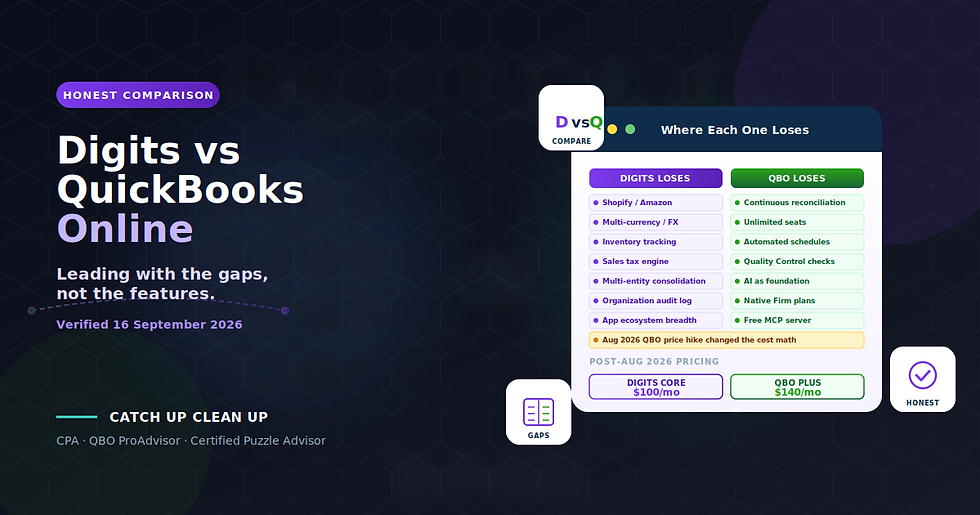
This comparison leads with the gaps, not the features. The features are similar enough that decisions come down to what each platform structurally cannot do
Digits win on: reconciliation module quality, unlimited seats, automated schedules for fixed assets and prepaids, Automated Quality Control, native Firm plans, AI as foundation rather than bolt-on
QuickBooks Online wins on: e-commerce integrations, multi-currency, inventory, sales tax, multi-entity consolidation, MACRS depreciation, audit trail, app ecosystem breadth (750+ vs approximately 12), international availability, track record
The QuickBooks August 2026 pricing increase changed the cost math significantly. Plus went from $99 to $140 (+41%). Advanced went from $200 to $340 (+70%). Digits Core at $100/mo now undercuts QBO Plus for feature-comparable use cases
Digits' AI auto-posts to the ledger on confidence. QuickBooks Online's AI suggests categorizations that a user then approves. These are different autonomy models and worth understanding before committing
The absence of an organization-wide audit log at Digits is a real control gap for compliance-sensitive businesses. QBO maintains one by default
Neither platform handles e-commerce sellers well without external help. QBO has better native e-commerce integrations, but sellers with material Shopify or Amazon volume use A2X or similar summary-journal-entry tools regardless of platform
Verified 16 September 2026: pricing, mechanics, and features may evolve; verify current specifics before purchase
Methodology
Every claim below about Digits is sourced to Digits' own documentation at help.digits.com or press releases. Every claim about QuickBooks Online is sourced to Intuit's documentation at quickbooks.intuit.com or verified against current pricing and feature pages.
Where Digits' documentation contradicts itself (it does, in 15 documented places per my Digits gap audit), I use the help center version as authoritative because Digits itself documents that pattern. Where QuickBooks Online has multiple tiers, I compare against QBO Plus as the reference tier because it is the most commonly purchased plan for the businesses that would consider Digits as an alternative.
Confidence labels used throughout:
[Docs] — stated in the vendor's own documentation
[Absence] — the documentation is silent on a capability that would normally be documented if it existed
[Market] — verifiable from third-party market data
The Comparison Grid Both Vendors Would Prefer You Not See
Let me construct the comparison grid honestly, including the rows Digits keeps off its own comparison pages.
Capability | Digits | QuickBooks Online |
Multi-currency support | No | Yes (Essentials+) |
Inventory tracking | No | Yes (Plus+) |
Sales tax engine | No | Yes (all tiers) |
Multi-entity consolidation | No (separate subscriptions) | Limited native, Advanced tier + apps |
MACRS depreciation | No (straight-line only) | Via app ecosystem |
Shopify integration | No (A2X workaround) | Yes (native + A2X) |
Amazon integration | No (A2X workaround) | Yes (via A2X, Webgility, etc.) |
Organization-wide audit log | Not documented | Yes (all tiers) |
Non-USD transactions | Silently rejected | Handled with FX conversion |
Non-US businesses | Not supported | Yes (UK, Canada, Australia, etc.) |
App ecosystem size | ~12 documented integrations | 750+ |
Track record | Selling since 2019 | Cloud version since 2004 |
Unlimited team seats | Yes (all plans) | No (Plus caps at 5 billable users) |
Continuous reconciliation | Yes | No (traditional reconcile queue) |
Automated fixed asset schedules | Yes | No (manual or via app) |
Automated prepaid schedules | Yes | No (manual or via app) |
Automated Quality Control | Yes (11 built-in checks + custom) | No native equivalent |
AI as foundation | Yes | Layered on top of legacy architecture |
Native Firm plans with client tier billing | Yes | Via QuickBooks Online Accountant |
Free MCP server for AI assistants | Yes | Not documented |
Client structural inability to change COA | Yes (by role design) | No (admin can do anything) |
Cash vs accrual report toggle | No | Yes |
Downloadable company file | No | Not on cloud version |
The rows above the horizontal midpoint favor QuickBooks Online. The rows below favor Digits. Which side matters more to you depends entirely on your specific business.
Where QuickBooks Online Loses (Digits' Genuine Advantages)
For a specific business profile, Digits is genuinely the better platform. Here are the reasons why, verified against Digits' documentation.
1. Reconciliation Module Quality
Digits' reconciliation module is genuinely the best in its AI-native cohort and better than QBO's reconcile screen by a clear margin. It reconciles continuously against bank statements rather than as a periodic exercise. It flags only what needs review through a four-type exception taxonomy (missing, duplicate, mismatched amount, mismatched date). It fills gaps automatically. It reopens periods automatically on late-arriving transactions. It requires ordered finalization, which prevents the common QBO error of reconciling a later month while an earlier month remains open.
For firms running standardized close processes across multiple clients, this is genuinely timesaving. QuickBooks Online's reconciliation model is functionally unchanged from twenty years ago and requires manual walkthrough every month. Digits' model is designed for continuous operation with human review only where the system cannot resolve automatically.
Winner: Digits, by a clear margin.
2. Unlimited Team Seats
[Docs] Digits states directly: "There are no limits on how many users can be signed in and using Digits simultaneously." Firm plans include "Unlimited Team Seats." Billing is per business or per client, never per seat.
QuickBooks Online Plus caps billable users at five. Advanced tier extends this to 25 users. For a client with a bookkeeper, an internal CPA, a fractional CFO, a lender who needs read access, and two internal managers, the QBO Plus five-user cap forces a jump to Advanced (which after the August 2026 price increase costs $340/month).
For a firm managing 20 clients where each has three to five external stakeholders needing access, the per-user cost differential over a year runs into significant dollars.
Winner: Digits, structurally and clearly.
3. Automated Schedules for Fixed Assets and Prepaids
Digits' Schedules module handles fixed asset depreciation and prepaid expense amortization automatically within the ledger. Straight-line only (see the corresponding QBO advantage below), but the workflow automation is genuinely differentiated. Digits detect fixed asset candidates at $2,500 and prepaid candidates at $500. Default depreciation is 60 months for fixed assets and 12 months for prepaids. Disposal workflow is handled inside the module.
QuickBooks Online has no equivalent native functionality. Depreciation and amortization are handled through manual journal entries or through third-party apps in the QBO ecosystem. For firms managing many clients with fixed assets, this is real time saved every month.
Winner: Digits.
4. Automated Quality Control
Digits ships eleven built-in Automated Quality Control checks plus custom check authoring in plain English with a compiled-logic preview. Digits' own docs describe the natural-language authoring: "It reflects the actual logic Digits will run, not just a restatement of what you typed."
Nothing comparable exists in QuickBooks Online. QBO relies on third-party review apps or firm-authored checklists implemented outside the system. For firms running standardized quality control across a portfolio of clients, this is genuinely differentiated.
Winner: Digits.
5. Native Firm Plans with Client-Tier Billing
Digits' Firm plans are priced per client per month, billed to the firm, ranging from Starter at $35 to Pro at $250 for Solo tier and Starter Plus at $50 to Pro Plus at $250 for the Plus tier. Enterprise pricing is custom outcome-based.
QuickBooks Online Accountant has a firm-facing structure but the wholesale billing model is different. Firms billing clients wholesale for QBO get discounts through the ProAdvisor program, but the underlying architecture is client-owned subscription with firm access, not firm-owned client entities.
For firms operating in a full-service capacity where clients receive statements through the firm rather than directly from Intuit, Digits' native architecture is more natural.
Winner: Digits for full-service firm operations. QuickBooks Online for firms whose clients want their own billing relationship with the vendor.
6. AI as Foundation Rather Than Bolt-On
Digits were architected AI-native from the ground up. QuickBooks Online layered AI features onto a database and workflow that predated the technology. This is a real architectural difference, not just marketing language.
The concrete example: QBO's AI categorization suggests categorizations that the user then approves. Digits' AI auto-posts to the ledger on confidence. QBO's model is the retrofit; Digits' model is the ground-up design decision. Whether that is an advantage or a risk depends on your control philosophy, but the architectural difference is real.
Winner: Digits on architecture. Whether that translates to advantage for your business depends on your comfort with AI autonomy.
7. Client Structurally Cannot Touch Chart of Accounts
[Docs] Digits documents this as a genuine control feature: "Managed clients can view and comment on the Chart of Accounts, but they can't add, edit, or delete accounts. Your accounting firm manages the Chart of Accounts for your organization."
QuickBooks Online has no equivalent structural constraint. A client with admin access can restructure the chart of accounts, create duplicate accounts, or delete accounts (with warnings). Every firm running QBO for client engagements has encountered this problem.
Winner: Digits, for firms serving clients where COA integrity matters.
8. Free MCP Server and Open Developer Surface
Digits publishes a free read-only MCP server at every plan tier for AI assistant integration. Documentation at developer.digits.com describes an open API with no partner fees. This is real forward-looking infrastructure.
QuickBooks Online has an API (well-documented, mature) and an app ecosystem, but MCP server support is not native. Third parties may build QBO-MCP bridges, but they are not first-party. For firms integrating AI assistants into workflow, Digits is architecturally further along.
Winner: Digits.
Where Digits Loses (QuickBooks Online's Genuine Advantages)
For a different specific business profile, QuickBooks Online is genuinely the better platform. Here are the reasons why.
9. E-commerce Integration Ecosystem
QuickBooks Online has direct native or through-A2X connections to Shopify, Amazon, Etsy, eBay, WooCommerce, Walmart, BigCommerce, and Squarespace Commerce. The A2X and Bookkeep integrations handle the summary journal entry workflow at scale.
Digits have no e-commerce integrations of any kind. [Docs] The documented workaround is "A2X plus manual journal entries." For sellers with material Shopify or Amazon volume, this is a hard limitation. A2X handles the aggregation but the last-mile posting is manual rather than integrated.
For any business selling online at meaningful scale, QBO is the clear winner.
Winner: QuickBooks Online, decisively for e-commerce sellers.
10. Multi-Currency Support
QuickBooks Online (Essentials tier and above) supports multi-currency accounting with automatic FX conversion, exchange rate updates, and multi-currency reporting.
Digits [Docs]: "Digits does not perform currency conversion, FX revaluation, or multi-currency reporting." More dangerously, non-USD transactions from Gusto, Stripe, and sometimes Ramp are silently rejected with no exception queue. A US business with any international revenue exposure through these platforms can have transactions vanish from the ledger.
For any business with foreign currency transactions, QBO handles them correctly and Digits does not.
Winner: QuickBooks Online. Structural.
11. Inventory Tracking
QuickBooks Online Plus tier includes inventory management with item-level tracking, quantity on hand, reorder points, FIFO costing, and inventory valuation. Advanced tier adds landed cost calculation and batch tracking.
Digits [Docs]: "It doesn't track item-level quantities or stock on hand." For businesses managing physical inventory, Digits is not the right ledger regardless of any other feature.
Winner: QuickBooks Online.
12. Sales Tax Engine
QuickBooks Online includes an integrated sales tax engine at all tiers with nexus tracking, jurisdiction determination, and sales tax return preparation.
Digits [Docs] have no sales tax engine of any kind. No calculation, no tracking, no Avalara or TaxJar integration. For businesses with multi-state sales tax obligations, tax handling must live entirely outside Digits.
For any business subject to material sales tax obligations, QBO handles them and Digits does not.
Winner: QuickBooks Online. Decisively.
13. Multi-Entity Consolidation
QuickBooks Online Advanced tier includes some multi-entity capabilities. Third-party apps (Fathom, LivePlan, Spotlight Reporting, and others) extend this substantially. The QBO ecosystem supports consolidation workflows even where the base product does not.
Digits [Docs]: "create separate Digits accounts for each entity" with separate subscription for each. No consolidated statements. No eliminations. No intercompany entries. For businesses with multi-entity structures, this is a hard stop.
Winner: QuickBooks Online for anything requiring consolidation.
14. MACRS Depreciation
QuickBooks Online has no native MACRS depreciation, but the app ecosystem provides mature MACRS-capable tools (Fixed Asset Manager, Asset Panda, and others integrate with QBO).
Digits provides straight-line book depreciation only. MACRS calculations for tax purposes must live entirely outside Digits in the tax preparer's workpaper. This is standard practice regardless of platform, but Digits has no ecosystem to fill the gap where QBO does.
Winner: QuickBooks Online through its ecosystem, though neither is strong here.
15. Organization-Wide Audit Log
QuickBooks Online includes an audit log at every tier capturing every change with actor attribution, timestamp, and diff. It is exportable and immutable. For compliance-sensitive businesses, external audit requirements, or firms needing formal internal controls, this is a foundational capability.
Digits [Absence]: no organization-wide, exportable, immutable audit log is documented. This is the most significant documented control gap in Digits, and Puzzle's public critique of Digits names it directly as a fair criticism. For a system where AI auto-posts to the ledger on confidence, the absence of an audit trail that captures every mutation is a legitimate control gap.
For businesses with SOX obligations, external audit requirements, or formal internal controls, QBO is the appropriate platform and Digits requires substantial compensating controls to fill the gap.
Winner: QuickBooks Online. Structural and decisive for compliance-sensitive businesses.
16. App Ecosystem Breadth
QuickBooks Online's app ecosystem includes 750+ integrated applications spanning inventory management, payroll, expense management, CRM, project management, e-commerce, tax, reporting, industry-specific solutions, and specialized workflow tools.
Digits' documented integrations number approximately 12, covering the core financial connections (Plaid, Stripe, Gusto, Ramp, BILL, and Finch's payroll network). Bidirectional sync with anything is documented as not existing; every integration is one-way inbound.
For businesses whose operations require any specialized tool outside Digits' documented integration list, QBO's ecosystem is materially broader.
Winner: QuickBooks Online. Not close.
17. International Availability
QuickBooks Online is available in the US, UK, Canada, Australia, and multiple other international markets. Each market's version handles local tax, banking, and regulatory requirements.
Digits [Docs]: "Digits is currently available only for U.S.-based businesses that use U.S. banks and operate in USD." Explicitly excluded: "Canada, the United Kingdom, Australia, Malaysia, or the EU."
For any non-US business, or any business with international operations that would benefit from a consistent platform across geographies, QBO is available where Digits is not.
Winner: QuickBooks Online. Structural.
18. Track Record and Maturity
QuickBooks Online launched in 2004 and has been actively developed for over 20 years. Every edge case in accounting workflow has been encountered, documented, and generally handled. The support ecosystem is mature. Firm expertise is abundant. Migration paths from other platforms are well-worn.
Digits launched publicly in 2019 with the Agentic General Ledger repositioning in 2025.
Product surface area is more limited. Edge cases in unusual accounting workflows may not yet be documented, tested, or handled. The support ecosystem is developing. Firm expertise is limited to the approximately 700 firms who have applied to the Partner
Program (Digits boilerplate says "hundreds" are actually on it).
For businesses with unusual accounting workflows, complex compliance requirements, or edge cases that will surface once operations scale, QBO's track record is a real advantage.
Winner: QuickBooks Online on maturity.
19. Partial Invoice Payments and Recurring Invoices
QuickBooks Online supports partial invoice payments, recurring invoice creation, estimate-to-invoice conversion, and invoice custom fields.
Digits [Docs]: "Each invoice can only match one transaction in Digits today." Recurring invoices are documented as "on the roadmap." Estimate-to-invoice conversion is not supported. Invoice custom fields are not available.
For any business with milestone billing, deposit-plus-final payment structures, or recurring invoicing needs, QBO handles them and Digits requires workarounds.
Winner: QuickBooks Online.
20. 1099 E-Filing
QuickBooks Online supports 1099 e-filing directly through the platform.
Digits [Docs] provides 1099 tracking and eligibility identification, but actual 1099 e-filing requires a separate tool or filing service.
For firms handling 1099 filing for many clients, QBO's direct filing is a workflow advantage.
Winner: QuickBooks Online.
The Cost Comparison, Honestly
Cost comparisons in accounting software are usually done incorrectly. The right comparison compares like-for-like feature sets across platforms, not sticker-price tier-for-tier.
QuickBooks Online Pricing After the August 2026 Increase
QuickBooks Online raised prices materially in August 2026:
Simple Start: $35/mo (was $30)
Essentials: $65/mo (was $60)
Plus: $140/mo (was $99, +41%)
Advanced: $340/mo (was $200, +70%)
The Plus and Advanced tier increases are significant enough that they change the cost math against alternatives.
Digits Pricing
Digits publishes three business plans:
Essentials: $65/mo
Core: $100/mo (Most Popular)
Pro: $250/mo (Coming Soon)
Firm plans are priced per client per month, ranging from Starter at $35 to Pro at $250 for Solo tier and up to Enterprise custom outcome-based pricing.
The Feature-Comparable Cost Comparison
For a small service business needing categorization, reconciliation, basic reporting, and a single-user login:
QuickBooks Online Simple Start ($35/mo) vs Digits Essentials ($65/mo)
QBO wins on cost. Digits win on unlimited seats even at this tier.
For a business needing multi-user access, class tracking, and inventory:
QuickBooks Online Plus ($140/mo) vs Digits Core ($100/mo)
Digits undercuts QBO Plus by $40/mo for feature-comparable use. Plus assumes 5 users; Digits Core has unlimited users. If your team needs more than 5 seats, QBO Advanced ($340/mo) is the correct comparison, and Digits Core beats it by $240/mo.
For a business needing dimensional accounting, multi-user access, and unlimited seats without hitting caps:
QuickBooks Online Advanced ($340/mo) vs Digits Core ($100/mo)
Digits Core is dramatically cheaper for teams needing more than 5 users, and includes dimensional accounting (Departments and Locations) at this tier.
The August 2026 QBO price increase materially changed this calculus. Before the increase, QBO Plus at $99/mo undercut Digits Core at $100/mo by $1/mo. After the increase, Digits Core undercuts QBO Plus by $40/mo and QBO Advanced by $240/mo for teams that need the seat count Advanced was previously the only way to get.
Cost winner: Digits, for feature-comparable use cases requiring more than 5 users, after the QBO August 2026 price increase.
Cost winner: QuickBooks Online, for the smallest single-user use cases at Simple Start.
Note: this is only the software cost. Migration cost, learning curve, and workflow re-engineering are separate line items that often exceed software cost differences in year one.
The Decision Framework
Reading through the gap comparison above with your specific business in mind is the exercise that answers the platform question honestly. Some businesses fit clearly with one platform and clearly do not fit with the other. Some businesses could go either way and the decision comes down to preference, team familiarity, or price sensitivity.
Choose Digits When
Your business operates entirely in USD, in the US, from US banks
You do not carry physical inventory that needs item-level tracking
Your sales tax obligations are minimal or handled by a specialist tool outside the ledger
You operate as a single entity, or accept per-entity accounting without consolidated statements
Your operations align to a standard monthly calendar
Your integrations align to Digits' documented ecosystem (Stripe, Gusto, Ramp, BILL, Plaid, Finch)
You value best-in-cohort reconciliation, automated schedules for fixed assets and prepaids, and native unlimited seats
Your team needs more than five users and QBO Advanced pricing after the August 2026 increase is prohibitive
You are comfortable with the AI auto-post autonomy model
You do not have material formal audit-trail obligations, or you can design compensating controls
Choose QuickBooks Online When
You are a non-US business, or have material international operations
You sell on Shopify, Amazon, or other e-commerce platforms
You carry physical inventory
You have material multi-state sales tax obligations
You have multi-entity structures requiring consolidation
You need MACRS depreciation inside the accounting system
You have SOX obligations, external audit requirements, or formal internal control requirements that require an audit log
You need partial invoice payments, recurring invoicing, or estimate-to-invoice conversion
You need 1099 e-filing directly from the accounting system
Your team needs no more than five users and QBO Plus pricing is workable
You prefer AI that suggests categorization for user approval over AI that auto-posts on confidence
You value the maturity, ecosystem breadth, and firm expertise availability of the incumbent
Both Platforms Lose When
You need genuinely complex e-commerce accounting with high transaction volumes, multi-channel operations, and material sales tax exposure. Both platforms handle this workably with A2X or similar summary journal entry tools, but neither natively excels
You need real-time revenue recognition for ASC 606 compliance. QBO does this through apps; Digits schedules module covers fixed assets and prepaids only. Puzzle handles this natively
You are mid-market ($10M-$1B revenue) with genuine ERP requirements. DualEntry, Sage Intacct, or NetSuite fit this profile better than either QBO or Digits
The Migration Reality Both Vendors Understate
Both vendors' comparison pages skip past the migration cost reality, but any honest platform comparison has to name it.
Migrating to Digits from QuickBooks Online. Digits document a QBO migration path that handles historical general ledger data through a one-time API pull. The migration is static and one-way with no reverse path. Bank feeds go live at Digits setup and load transactions into the workspace before the cutover date is decided; getting the cutover date wrong at onboarding is a documented one-way door. The cutover reconciliation typically shows thousands of uncleared items and has a documented four-step fix that firms only learn the hard way.
Migrating to QuickBooks Online from Digits. No documented path exists. QBO does not offer a native Digits import tool. Migration would require CSV export from Digits and journal entry rebuild in QBO. Digits' data export is documented but the format is not standardized for QBO import.
The reversibility asymmetry matters. A business that moves to Digits and later decides QBO was the right choice faces a materially harder return path than a business that moves to Digits from QBO. This is worth naming plainly to any client considering the switch.
Parallel Close. Digits documents Parallel Close as the recommended migration approach: run both systems for a month, tie out both to source data, then cut over cleanly. This is genuinely conservative and reduces risk substantially. For risk-averse clients, this is the correct migration approach and worth committing to explicitly in the migration scope.
My Kick migration checklist covers the workpaper-grade migration methodology for AI-native platforms generally; the same principles apply to a Digits migration.
The Bottom Line
Digits versus QuickBooks Online is not a contest for the best accounting platform overall. It is a fit decision between two structurally different products aimed at overlapping but distinct customer profiles.
For US-based service businesses with straightforward operations on a modern fintech stack, Digits is credibly the stronger platform. The reconciliation module, automated schedules, native unlimited seats, and Automated Quality Control are genuine differentiators. The AI auto-post autonomy model can be a real time savings for firms comfortable with the model and willing to design compensating controls for the audit log absence. After the August 2026 QBO price increase, Digits Core at $100/mo materially undercuts QBO Plus at $140/mo and QBO Advanced at $340/mo for feature-comparable use.
For businesses with international operations, e-commerce sales, inventory management, multi-entity consolidation, material sales tax obligations, or formal audit-trail requirements, QuickBooks Online is the appropriate platform and Digits requires either substantial compensating controls or is a hard structural mismatch. The 20-year track record, mature app ecosystem, and international availability are real advantages that Digits has not yet built.
For businesses that could go either way, three specific considerations tend to decide the question:
Team size. More than five users' tips toward Digits after the August 2026 QBO price increase.
AI autonomy comfort. Comfort with auto-posting tips toward Digits. Preference for AI-suggests-human-approves tips toward QBO.
Vendor risk tolerance. Comfort with a younger vendor tip toward Digits. Preference for the incumbent tips toward QBO.
Neither platform serves e-commerce sellers, inventory-carrying businesses, or non-US businesses well by itself. For those profiles, both platforms lose and the decision should focus on which platform loses less badly given the specific business context.
The honest recommendation is not to pick a platform without doing the structural fit assessment against your specific business first. The gap comparisons above is the diagnostic. Reading through them with your operations in mind is more useful than any marketing content either vendor will produce.
Ready to decide between Digits and QuickBooks Online for your business?
Most CPAs advising on this decision have a preference for one platform or the other and structure the recommendation around that preference. Platform-agnostic advisory is rarer than it should be. This piece exists because the honest answer to "which platform is better" is almost always "it depends on your specific business," and the specific business assessment is the work that most advisory calls skip.
Catch Up Clean Up specializes in platform-agnostic advisory across every AI-native accounting platform and QuickBooks Online. Because I am a QuickBooks Online ProAdvisor, a Certified Puzzle Advisor at Preferred Partner tier, and platform-agnostic in my broader advisory approach, I can honestly evaluate whether Digits, QuickBooks Online, Puzzle, Kick, DualEntry, or another platform fits your specific business without any structural incentive to recommend one over another.
The strategic reality worth naming: Digits is a strong fit for a specific customer profile. For businesses that fit that profile, adopting it after the August 2026 QBO price increase is a genuine upgrade in both capability and cost. For businesses outside that profile, the gaps documented above compound expensively and QuickBooks Online remains the honest recommendation.
What you get:
A 30-minute diagnostic call to assess Digits vs QuickBooks Online fit for your specific business
Objective evaluation using the structural gap framework rather than vendor marketing
Migration cost estimation and timeline for whichever platform is the right destination
Historical QBO cleanup before migration to materially reduce mapping complexity if Digits is the answer
The eight-phase Digits migration runbook executed with workpaper-grade discipline
Cutover reconciliation methodology and Parallel Close guidance
Post-migration validation and compensating control design for Digits' audit log absence
Ongoing bookkeeping on whichever platform is the right fit, with monthly audit trail review
Platform-agnostic advisory so the recommendation is based on your business, not our certifications
Book a free consultation and we will diagnose the platform question honestly.
Frequently Asked Questions
Is Digits cheaper than QuickBooks Online?
It depends on the tier comparison. For feature-comparable use cases after the August 2026 QBO price increase, Digits Core at $100/mo materially undercuts QBO Plus at $140/mo and QBO Advanced at $340/mo. For the smallest single-user use cases at QBO Simple Start ($35/mo), QBO is cheaper. Team size and feature requirements determine which comparison applies.
Can I run Shopify or Amazon on Digits?
Not with native integrations. Digits has no e-commerce integrations of any kind. The documented workaround is A2X plus manual journal entries. For sellers with material transaction volumes, QuickBooks Online is a materially better fit because it has both native Shopify integration and mature A2X, Bookkeep, and Webgility connectors.
Which platform handles multi-currency better?
QuickBooks Online, decisively. QBO Essentials tier and above handle multi-currency with automatic FX conversion. Digits do not perform currency conversion at all and silently reject non-USD transactions from Gusto, Stripe, and sometimes Ramp with no exception queue.
Does Digits have inventory tracking?
No. Digits explicitly states it does not track item-level quantities or stock on hand. QuickBooks Online Plus and Advanced tiers include inventory management. For any business managing physical inventory, QBO is the right platform.
Is Digits' AI safer than QuickBooks Online's AI?
Different, not safer. Digits' AI auto-posts to the ledger on confidence with a threshold that is neither published nor tunable. QuickBooks Online's AI suggests categorizations that the user then approves. The QBO model is more conservative but slower. The Digits model is faster but requires trust that the confidence threshold is calibrated correctly. Getting comfortable with the autonomy model is a real decision that should be made explicitly.
Which platform is better for firms managing multiple clients?
Depends on operational model. Digits have native Firm plans with per-client billing and unlimited team seats. QuickBooks Online Accountant has a mature firm program with the ProAdvisor network. Firms operating in full-service capacity where clients receive statements through the firm tend toward Digits. Firms whose clients want their own billing relationship with the vendor tend toward QBO.
Can I migrate back to QuickBooks Online from Digits if I change my mind?
Not easily. No documented Digits-to-QBO migration path exists. Migration would require CSV export from Digits and journal entry rebuild in QBO. This asymmetry (easy to migrate to Digits, hard to migrate back) is worth naming explicitly before committing to the switch.
What about the audit log gap in Digits?
Digits does not document an organization-wide, exportable, immutable audit log. QuickBooks Online includes one at every tier. For businesses with SOX obligations, external audit requirements, or formal internal controls, the QBO audit log is a structural advantage that Digits cannot yet match. Firms adopting Digits should design compensating controls if audit trail is material to their operations.


Comments